HighLevel to Votel migration guide
Migration Guide: move from HighLevel to Votel without rebuilding blind
The safest migration is a controlled export, rebuild, and validation project. Preserve the source account, move one low-risk workspace first, and do not switch production traffic until every revenue-critical workflow has passed a real test.
Affiliate link: we may earn a commission if you become a paying customer, at no extra cost to you. Details.
Researched by HighLevel vs Votel Editorial Team · Last verified · Updated · Methodology · We may earn a commission if you join Votel through our links. Details
Quick answer
A HighLevel-to-Votel move is possible, but it is not a universal one-click transfer
HighLevel can export contacts to CSV, while snapshots and sub-account transfers are designed to remain inside HighLevel. MoveOver can create a structured backup across 13 supported categories. Votel also has a GoHighLevel workspace importer for compatible export ZIPs. Those are distinct tools, so confirm package compatibility and plan to rebuild unsupported assets, reconnect external services, and test the result before cutover.
Referral link. We may receive a referral benefit if you purchase or qualify through it.
The safe path
Keep HighLevel running until the replacement has earned the cutover
- 01
Audit
Inventory the source
- 02
Export
Create a backup
- 03
Build
Prepare Votel
- 04
Validate
Test one account
- 05
Cut over
Keep a rollback window
Start with the constraint
HighLevel's native portability tools solve only part of the move
HighLevel's contact export produces a CSV containing visible contact fields such as names, email addresses, phone numbers, tags, and custom fields. HighLevel notes that long notes may be truncated and the export does not contain automation history such as past email and SMS logs.
Snapshots copy supported configuration assets between HighLevel sub-accounts. A HighLevel sub-account transfer moves an entire account to another HighLevel agency. Neither is a general cross-platform export, which is why a migration needs an inventory, a portable backup, and a documented rebuild plan.
Choose a route
Two practical ways to handle the migration
| Route | Best for | What you receive | Access |
|---|---|---|---|
| Manual rebuild | Small, simple accounts | You document, export, rebuild, and test everything | No separate tool required |
| MoveOver self-service | Technical teams that want a portable backup | Structured export across 13 supported categories | Available directly from the provider; see its site for current license options and pricing |
Check the provider page for current availability, license terms, and pricing.
What MoveOver captures
The 13 supported export categories
The self-service Chrome extension runs inside a logged-in HighLevel browser session and saves the export to the user's machine. Its ZIP includes category folders, manifests, an export report, and source material in formats such as JSON and HTML.
Sites and conversion assets
Websites and funnels, live-site crawl, forms, and calendars
Automation and AI
Automations, Voice AI agents, and AI Studio projects
CRM and messaging
Contacts and conversations, message templates, custom fields, custom values, and tags
Phone configuration
Phone numbers, Twilio configuration, and 10DLC campaign status
Plan to rebuild
Six asset groups are not included in the current MoveOver export
- Pipelines and opportunities
- Products, invoices, and payments
- Memberships and courses
- Media library files
- Email builder designs
- Users and permissions
You will also need to reconnect integrations, domains, payment gateways, phone and email services, and tracking. Treat credentials, approvals, and DNS as separate workstreams.
Built-in destination tool
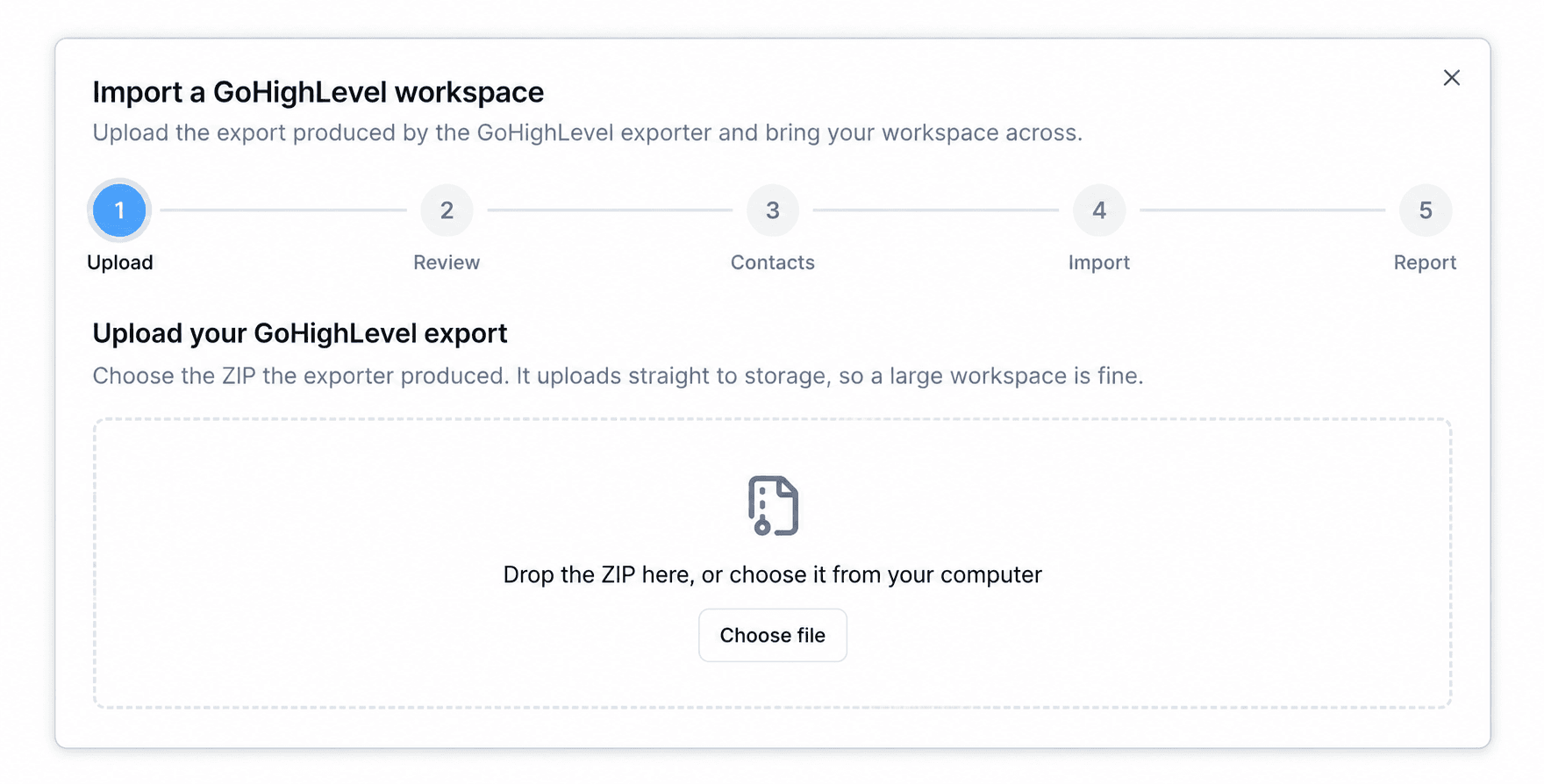
Votel has a five-step GoHighLevel workspace importer
Inside Votel, open Settings, Integrations, Other Integrations, and GoHighLevel. The importer walks through Upload, Review, Contacts, Import, and Report. It asks for a compatible HighLevel export ZIP. MoveOver's public page separately states that its current package does not automatically import or rebuild assets in Votel. Confirm the exact package format before treating the two tools as a direct pipeline.
Before cutover, use our migration acceptance checklist to record expected results, evidence, failures, and rollback ownership. Still deciding whether to switch at all? Start with the GoHighLevel vs Votel comparison.
Migration checklist
Move one controlled layer at a time
- 01
Inventory the account before touching it
List every domain, funnel, form, workflow, calendar, phone number, integration, payment connection, user role, pipeline, custom field, and reporting dependency. Assign an owner and acceptance test to each item.
- 02
Create a portable backup
Export contacts from HighLevel and preserve any other native files available to you. Use MoveOver if you want a structured backup across its 13 supported categories, including manifests and an export report.
- 03
Build the Votel destination first
Create the workspace, users, permissions, fields, pipelines, sending services, and test domains before changing production routing. This gives imported or rebuilt assets somewhere stable to land.
- 04
Import only compatible packages
Votel provides a GoHighLevel workspace importer, but compatibility depends on the export format. Review the package before importing. Treat a MoveOver backup as rebuild source material unless compatibility has been confirmed for that package.
- 05
Rebuild unsupported objects deliberately
Recreate pipelines, opportunities, products, payment records, memberships, media, email designs, users, and permissions where needed. Map old identifiers and statuses to their Votel equivalents.
- 06
Reconnect external dependencies
Reconnect domains, DNS, integrations, payment gateways, phone services, email authentication, pixels, analytics, webhooks, and tracking. Credentials and vendor approvals generally do not travel with content exports.
- 07
Test with one low-risk account
Run real acceptance tests for lead capture, booking, workflow triggers, email and SMS delivery, calls, payments, contact ownership, unsubscribe handling, and reporting before moving the next client.
- 08
Cut over with a rollback window
Schedule the final delta export, pause conflicting automations, switch traffic, monitor failures, and keep HighLevel available until the new system has passed a full operating cycle.
Frequently asked questions
HighLevel-to-Votel migration answers
Can I move a HighLevel snapshot directly into Votel?
No. HighLevel snapshots are designed to copy configuration assets between HighLevel accounts. They are not a general cross-platform export format.
Does MoveOver automatically import everything into Votel?
No. MoveOver currently exports supported HighLevel assets into an organized backup package. Its public documentation says direct Votel import is not yet included, so plan for a rebuild and reconnection pass.
Does Votel have a GoHighLevel importer?
Yes. Votel has a GoHighLevel workspace import flow under Settings, Integrations, and Other Integrations. It accepts a compatible export ZIP and walks through Upload, Review, Contacts, Import, and Report. Confirm that your specific export package is compatible before relying on it for a production move.
What does MoveOver not currently export?
Its public page lists pipelines and opportunities, products and payment records, memberships and courses, media library files, email builder designs, and users and permissions as not included.
Should I cancel HighLevel before the migration is finished?
No. Keep the original account available until contacts, pages, forms, calendars, automations, messaging, payments, domains, and reporting have passed your acceptance tests in Votel.
Is MoveOver an official HighLevel or Votel product?
No. MoveOver is independently operated and is not endorsed by HighLevel or Votel.
Sources and further reading
- HighLevel: export contacts to CSV
- HighLevel: snapshots overview
- HighLevel: sub-account transfers
- MoveOver: self-service HighLevel export tool
- Votel: GoHighLevel workspace importer
For how evidence is collected, weighed, and corrected, read our editorial methodology.