Votel feature deep dive
Votel Email Agent runs the send strategy, not just the copy
Votel Email Agent combines campaign controls, engagement-based sending, supervised automation, reply classification, and operational next actions. This guide separates the behavior we verified in a live account from documented capabilities and the campaign evidence we still need to collect.
Affiliate link: we may earn a commission if you become a paying customer, at no extra cost to you. Details.
Researched by HighLevel vs Votel Editorial Team · Last verified · Methodology · We may earn a commission if you join Votel through our links. Details
The short answer
It connects campaign strategy to the reply that comes back
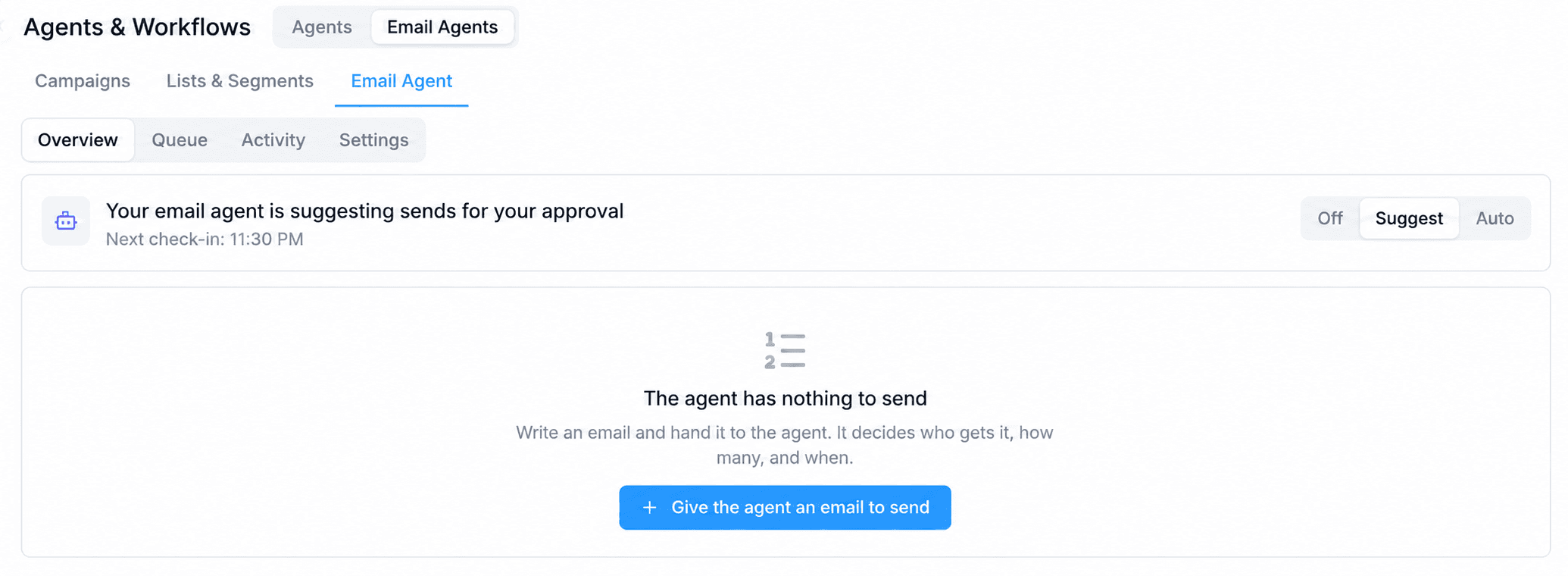
The user supplies the audience and campaign content. Email Agent can then choose eligible recipients inside that audience, pace the send, prioritize engagement tiers, reuse approved evergreen campaigns for controlled win-back, classify replies, and route configured next actions. Off, Suggest, and Auto modes determine how much control remains with the operator.
On this pageWhat it does
The operating model
One loop from audience selection to the next customer action
- 01
Select
Choose the campaign, lists or segments, and eligible recipient pool.
- 02
Pace
Apply daily volume, engagement waves, deliverability gates, and timing.
- 03
Understand
Classify a reply as intent, question, unsubscribe, auto-reply, or another configured class.
- 04
Act
Run permitted contact updates and choose one configured response path.
Why it stands out: in our review, we did not find one native HighLevel feature that combines campaign pacing, engagement tiers, controlled win-back, reply classification, response actions, and operator-selectable autonomy in one Email Agent workspace.
Human control
Start with approval, then increase autonomy deliberately
Off
01Manual control
The Email Agent does not prepare or run agent-managed campaign work.
Suggest
02Approval queue
The Email Agent can prepare proposed work, but a person reviews it before sending.
Auto
03Approved automation
The Email Agent can operate configured campaign behavior without approving every individual send.
Campaign and audience
The content, audience, and recipient estimate remain visible
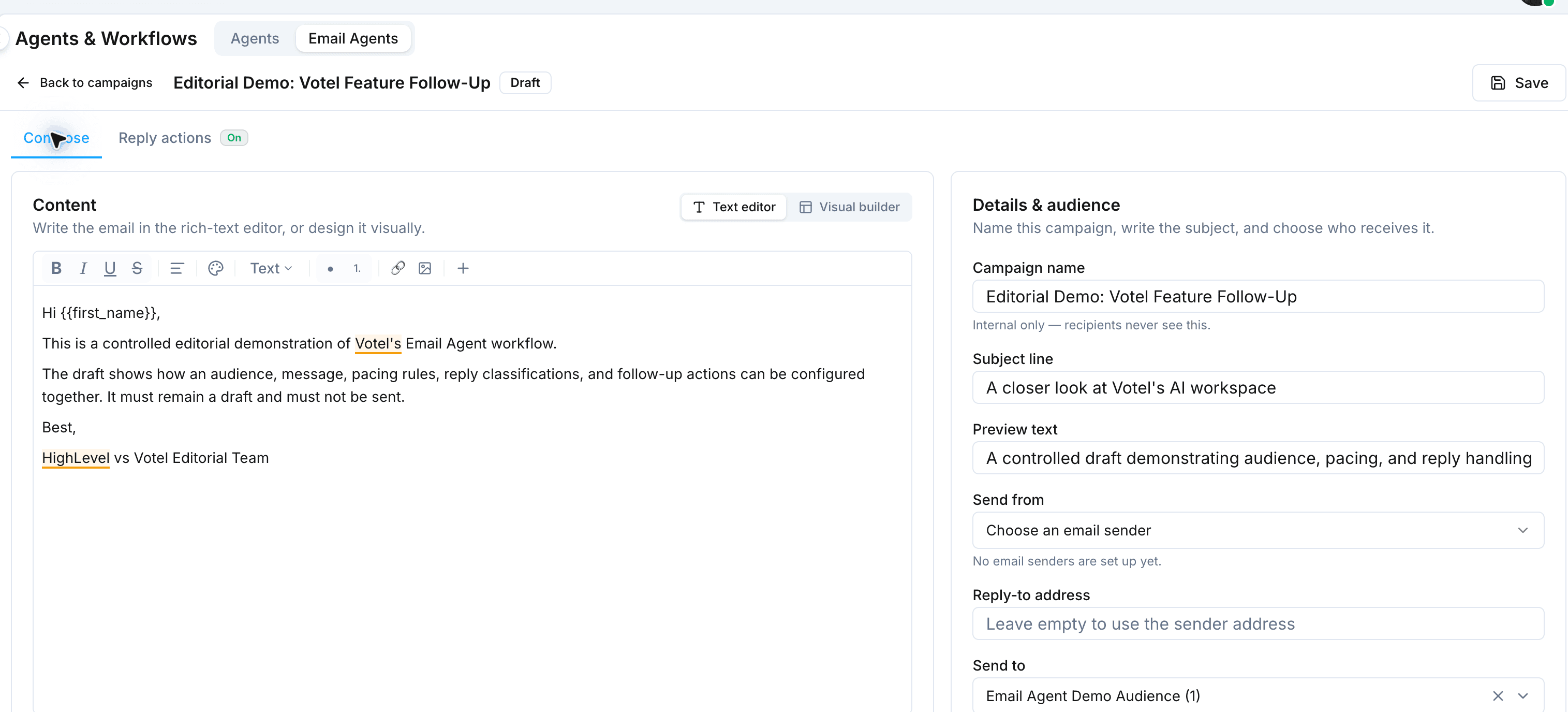
The campaign composer keeps the campaign name, subject, preview text, visual or text content, selected audience, live recipient estimate, and Reply Actions setting together. The Email Agent works inside the lists or segments the operator chooses. It does not silently create an audience or replace the campaign strategy.
Four quick-audience starting points
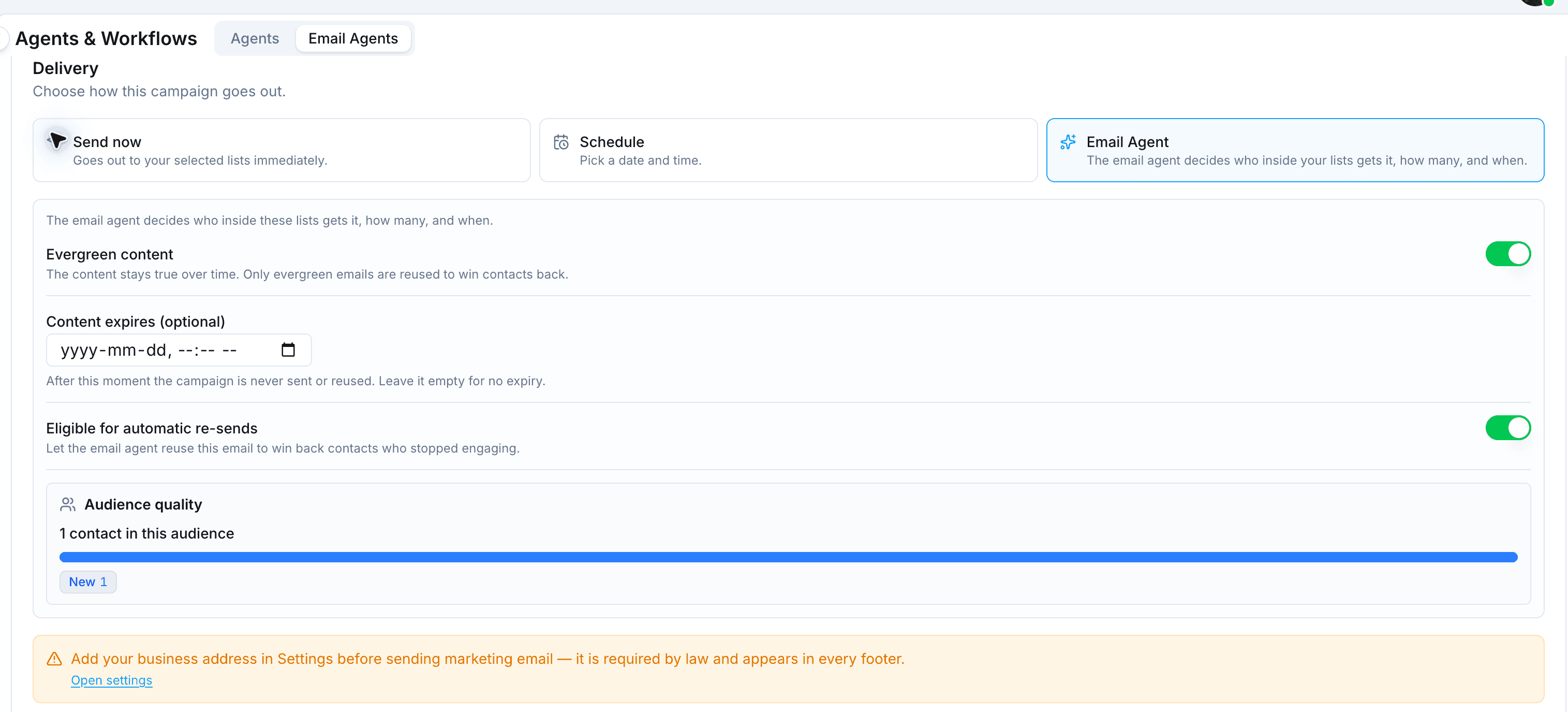
Votel's campaign composer can create an editable segment from a preset. These presets are available for operator-directed sends. When Email Agent delivery is selected, the presets disappear and audience quality moves into the Delivery panel because the agent chooses eligible people inside the selected lists.
- Most engaged
- Contacts who clicked or replied in the last 30 days.
- Everyone active
- Recently engaged contacts plus contacts who are still new.
- Everyone except dormant
- The selected audience without contacts who stopped opening.
- Win-back
- Contacts who cooled off and may be eligible for a re-engagement attempt.
Engagement waves and warmup
Begin with stronger engagement signals, then broaden carefully
Votel documents engagement tiers that can organize recipients into waves. More engaged contacts can lead the send before later tiers. Warmup logic monitors bounce, complaint, and open-rate gates while daily volume grows, and send-time optimization can hold a contact's copy for a stronger engagement window. Votel also says bot and security-scanner activity does not change a contact's tier.
- 01Hot
- 02Engaged
- 03New
- 04Cooling
- 05Dormant
- 06Sunset
- 07Unrated
Bounce rate
A deliverability gate used while sending volume builds.
Complaint rate
A negative-signal gate that can constrain progression.
Open rate
An engagement signal used alongside the other warmup checks.
Controlled win-back
Reuse proven evergreen campaigns instead of inventing a new one
Votel's documented win-back behavior selects eligible evergreen emails that have already earned engagement. Operators can reserve a portion of daily capacity for dormant contacts, apply cooldowns, cap attempts, and keep those contacts within a controlled share of the send. The documented boundary matters: Email Agent does not write a brand-new win-back campaign on its own.
Queue, approval, and receipts
The operating record is designed to explain what the agent decided
Votel documents a queue that preserves campaign order across days, an approval step when Suggest mode prepares a plan, and an Activity receipt for each daily decision. A queued campaign can continue across multiple days until its eligible audience has received it or its content expires. Skipped campaigns are named with a reason instead of disappearing silently.
Queue
Shows running order, evergreen and expiry badges, progress, and whether a campaign may be reused.
Suggest approval
Presents the planned audience and win-back work before an operator approves or skips the day.
Activity receipt
Records Day, Status, Sent, Emails reused, tier counts, waves, skipped campaigns, and deliverability readings.
Documented queue lifecycle
- 01
Draft
The campaign remains editable while its content, audience, sender, and delivery rules are prepared.
- 02
In the agent’s queue
The operator hands it to Email Agent. Queue position, reuse, and expiry badges show what can happen next.
- 03
Daily plan
The agent recalculates engagement tiers and prepares audience, send order, win-back, and warmup decisions.
- 04
Receipt
Activity records the resulting sends, failures, skips, rested contacts, tiers, waves, reuse, and deliverability readings.
A campaign at the top can continue across multiple days until the eligible audience has received it or the content expires. Votel's documentation says the same campaign is not sent to the same contact twice. If a queued campaign is passed over, it is removed from the queue and named in the receipt with the reason.
Before sending: the plan
In Suggest mode, the operator can inspect the audience counts, sending hours, wave order, win-back budget and reused emails, plus the warmup level, cap, and gate readings. Approve and send proceeds; Skip today leaves the queue untouched for a fresh decision tomorrow.
After the decision: the receipt
The expanded Activity row documents Sent, Failed, Skipped, Contacts rested, sends by engagement tier, planned versus completed waves, reused emails, passed-over campaigns, and the day's bounce, complaint, and open readings.
Evidence boundary: we verified that Queue and Activity exist in the live workspace. The detailed plan and receipt behavior above comes from Votel's documentation and remains to be captured during the controlled delivery test.
Sending infrastructure
Built-in Mailgun is distinct from bring-your-own email providers
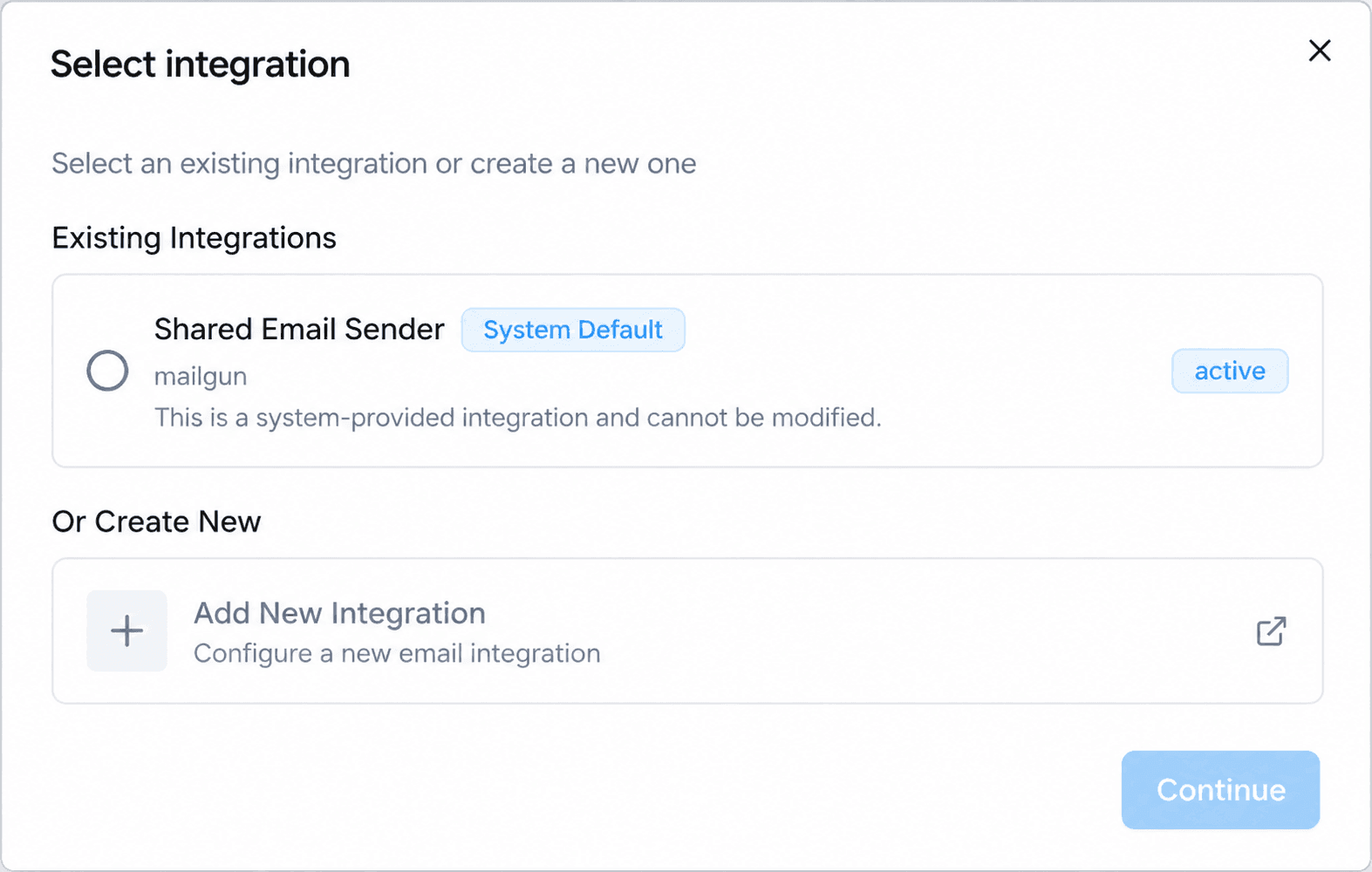
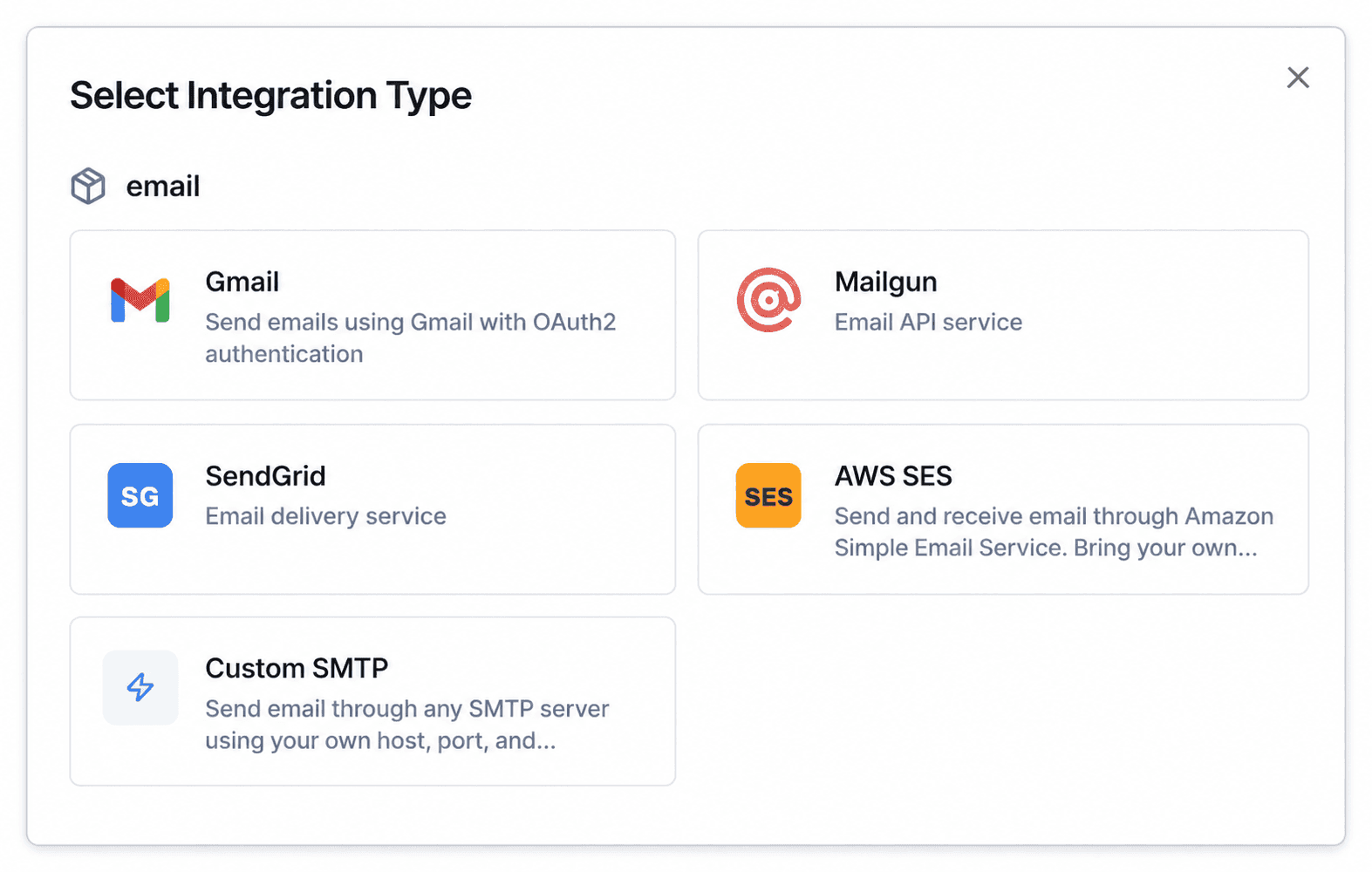
Votel provides a shared Mailgun integration as the system default. The Sender Identity flow also offers Gmail, Mailgun, SendGrid, AWS SES, and custom SMTP connections. Those choices do not all provide the same Email Agent behavior: Votel's documentation says agent-controlled timing, warmup, and per-contact send times require the built-in sender rather than a user-connected SendGrid or Amazon SES sender.
Controlled acceptance test
The remaining test has four observable checkpoints
The draft is ready for a narrow test after a sender, business address, and inbound reply route are configured. The test should remain in Suggest mode and use only the controlled contact already selected.
- 01
Approval
Capture the proposed daily plan in Queue and confirm that nothing sends before approval.
- 02
Delivery
Approve one controlled message, then capture its delivered campaign status and Activity receipt.
- 03
Classification
Reply with an unmistakable positive-intent message and record the class the agent assigns.
- 04
Contact update
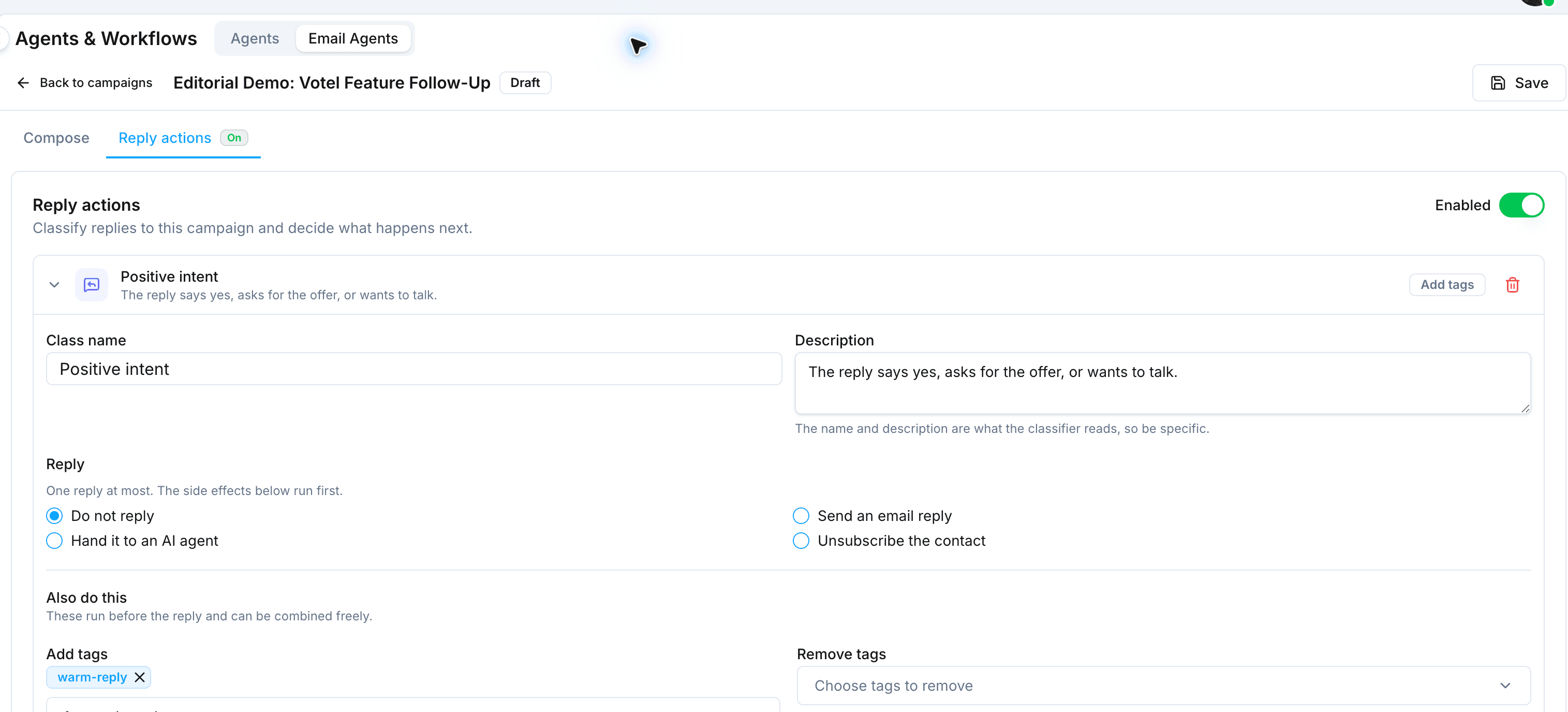
Confirm the warm-reply tag and contact activity while verifying that the Do not reply choice sent no automated response.
What is verified and what still needs campaign evidence
Verified in the live account
- • Queue, Activity, and Settings areas.
- • Off, Suggest, and Auto controls.
- • A saved, populated campaign draft with one controlled test contact.
- • Email Agent delivery, evergreen reuse, expiry, and automatic re-send controls.
- • Enabled reply classification with a no-reply response and tag side effect.
- • Built-in Mailgun and bring-your-own provider options.
Open verification items
- • Run a populated campaign through approval and delivery.
- • Capture a Queue with more than one campaign and visible position, evergreen, reuse, and expiry states.
- • Capture the waiting plan in Suggest mode before approval.
- • Capture an expanded Activity receipt after the controlled send.
- • Receive a controlled reply and verify its classification.
- • Confirm the resulting tag, contact-field, unsubscribe, or reply action.
- • Measure performance only after enough real campaign data exists.
The controlled demonstration used one test contact, no configured sender, and no business address. Votel kept the handoff control disabled, and no email was delivered. No performance result, conversion rate, deliverability improvement, or revenue outcome is claimed.
Votel Email Agent questions
What is Votel Email Agent?
Votel Email Agent is a campaign operating system that works with user-supplied audiences and campaign content. It can manage eligible recipients, daily volume, send timing, engagement waves, win-back rules, reply classification, configured actions, and the level of operator approval.
Does Email Agent write an entire campaign automatically?
The reviewed interface keeps campaign content and audience selection explicit. Votel's win-back documentation says the agent reuses eligible evergreen campaigns that already exist rather than inventing a new win-back campaign.
Can I approve Email Agent sends before they go out?
Yes. Suggest mode keeps proposed work behind an approval step. Off preserves manual control, while Auto allows configured behavior to proceed without approving every send.
What can happen after an email reply is classified?
A classification can run side effects such as adding or removing tags and updating contact fields, followed by at most one response action such as no action, an email reply, an unsubscribe, or handing that individual message to an AI agent.
Can Email Agent use my own SendGrid or Amazon SES sender?
Votel supports bring-your-own email providers generally, but its documentation says Email Agent timing, warmup, and per-contact send-time controls require Votel's built-in sender rather than a user-connected SendGrid or Amazon SES sender.
Has this review completed a live end-to-end Email Agent campaign?
Not yet. We populated a controlled demonstration with one test contact and no delivered email. Queue, delivery, reply classification, and the resulting contact update remain open verification items.
Continue exploring Votel's agent system
See how Email Agent fits beside the general AI Assistant, customer-facing agents, and the visual workflow builder.