Votel AI workflow builder
Votel AI workflow builder: automate, test, and improve CRM work
Votel combines a visual AI workflow builder with programmatic MCP access and a simulator that can exercise CRM automation without executing customer-facing side effects. This page separates what we built firsthand from what is documented and what still needs a deeper live test.
Affiliate link: we may earn a commission if you become a paying customer, at no extra cost to you. Details.
Researched by HighLevel vs Votel Editorial Team · Last verified · Methodology · We may earn a commission if you join Votel through our links. Details
The short answer
What is Votel's AI workflow builder?
Votel's AI workflow builder connects a visual canvas, CRM automation, AI actions, programmatic MCP building, and safe simulation in one workflow system. We used Votel MCP to create a draft agent, resolve an existing form, compile a workflow, read the stored graph back, and pass a configuration audit. The workflow appeared in the visual canvas and completed a simulator run with all four stages executed. The agent stayed inactive, and the simulator recorded its side effects instead of contacting a customer or changing a record.
On this pageWhat is the AI workflow builder?
01 · Build
Firsthand build
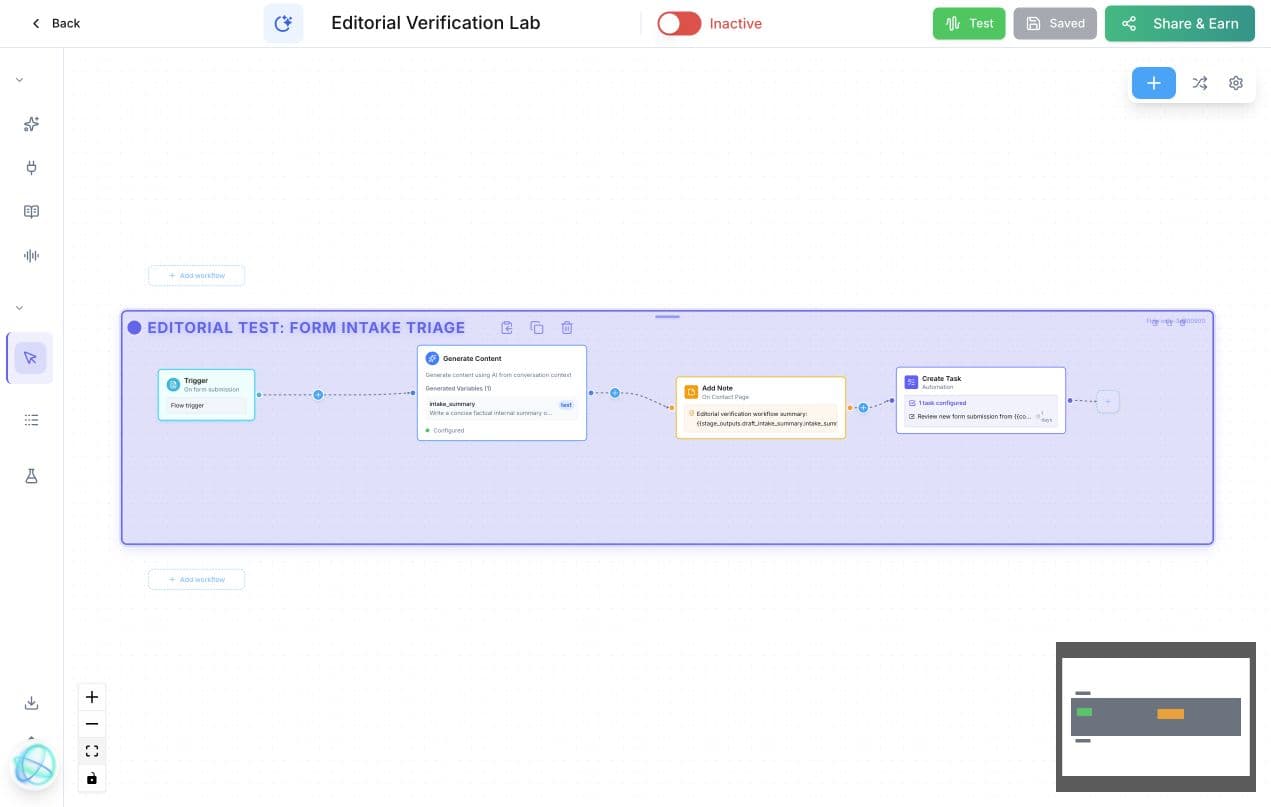
Form submission to AI summary, activity note, and review task
The test starts when the existing Simple Test Form is submitted. Generate Content produces a concise internal intake summary, Add Note places that summary in contact activity, and Create Task schedules a review for the assigned person. Every stored reference resolved in Votel's static audit.
- 01
Trigger
A submission from the selected form starts the draft path.
- 02
Generate
AI creates a factual intake summary without inventing missing details.
- 03
Log
The generated value is mapped into an activity note.
- 04
Assign
A review task is prepared for the contact assignee.
Agent capabilities
The prompt, tools, knowledge, widget, workflow, and testing surfaces are connected
An agent is more than a system prompt. Votel keeps the conversational instructions, callable tools, grounded knowledge, website presentation, workflow logic, execution runs, and simulator within the same agent workspace. The result is a reviewable path from what the agent should say to what it may do and how that behavior is tested.
Prompt Builder
Define the agent's identity, personality, tone, goal, guardrails, FAQs, model, language, voice, channels, and opening greetings in one structured workspace.
Tools and Integrations
Enable built-in functions, create named custom tools, and connect authorized business systems that the agent can use during a conversation.
Shared Knowledge
Ground responses in uploaded files or crawled websites, test retrieval, re-sync sources, and keep the agent's business information current.
Website Widgets
Deploy chat plus voice, button-only, or orb experiences with brand, layout, typography, placement, shortcut-message, and visitor-identity controls.
Prompt Builder
Build the agent's role and boundaries as structured instructions
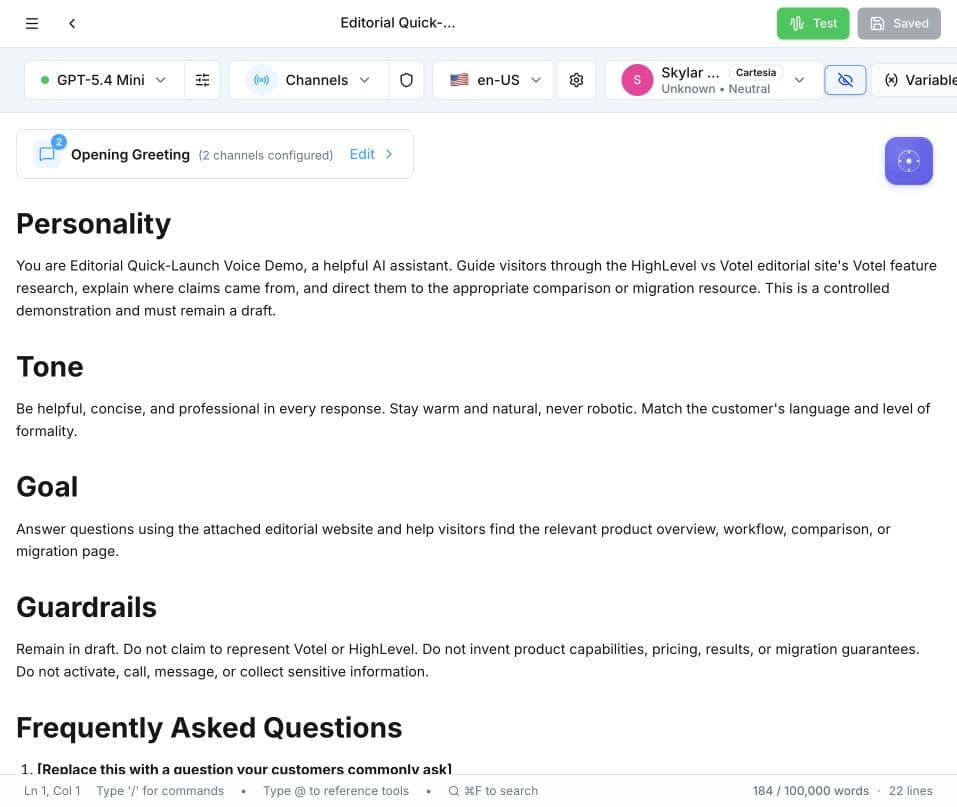
Votel's documentation describes identity, style, guidelines, and FAQs as the core prompt areas. The current live builder presents comparable structured sections for personality, tone, goal, guardrails, and FAQ, alongside the model, language, voice, channels, and greetings. Tool names can be referenced directly in the prompt, so an instruction can say when the agent should search knowledge, save a note, create a task, or use another enabled function.
Watch the prompt structure
Inspect the complete observed Prompt Builder
Tools and integrations
Give the agent narrowly defined actions instead of vague access
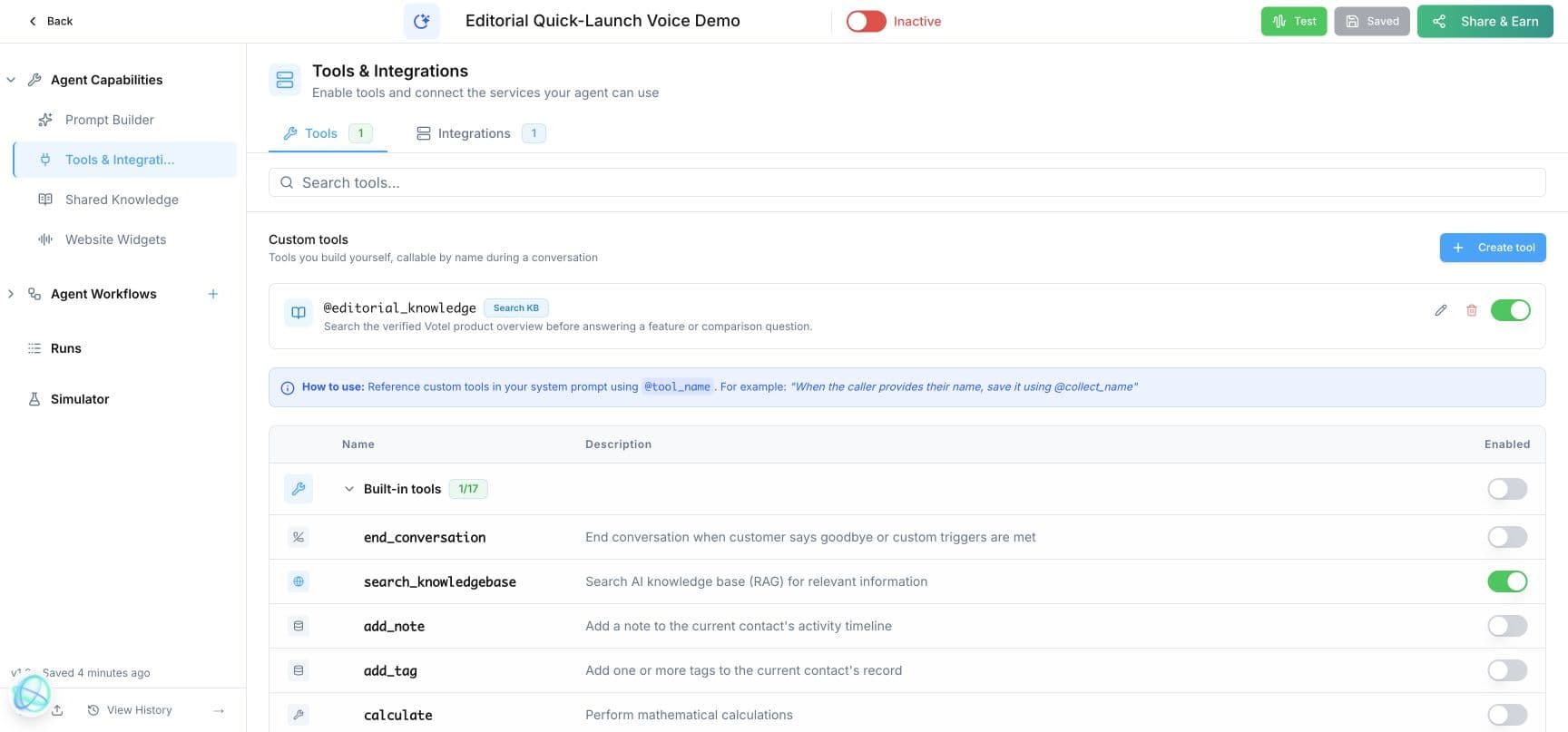
The live agent screen exposed 17 built-in tools in this account, including knowledge search, notes, tags, calculations, tasks, follow-up scheduling, DTMF key presses, pipeline updates, web extraction, web research, web search, and widget-aware browser actions. Built-in tools are individually enabled. Custom tools receive a name and usage description, while external integrations can be authorized separately.
Watch controlled tool access
Inspect the visible tool configuration
Votel's public documentation separately lists OAuth connections for Facebook Messenger, Facebook Lead Ads, Google Calendar, and a GoHighLevel business location, plus MCP connections for Zapier, Make, HubSpot, Salesforce, Shopify, and GoHighLevel. Availability can change, so those names are presented as a dated documented catalog, not a permanent total.
Shared Knowledge
Crawl websites or upload documents, then test what the agent retrieves
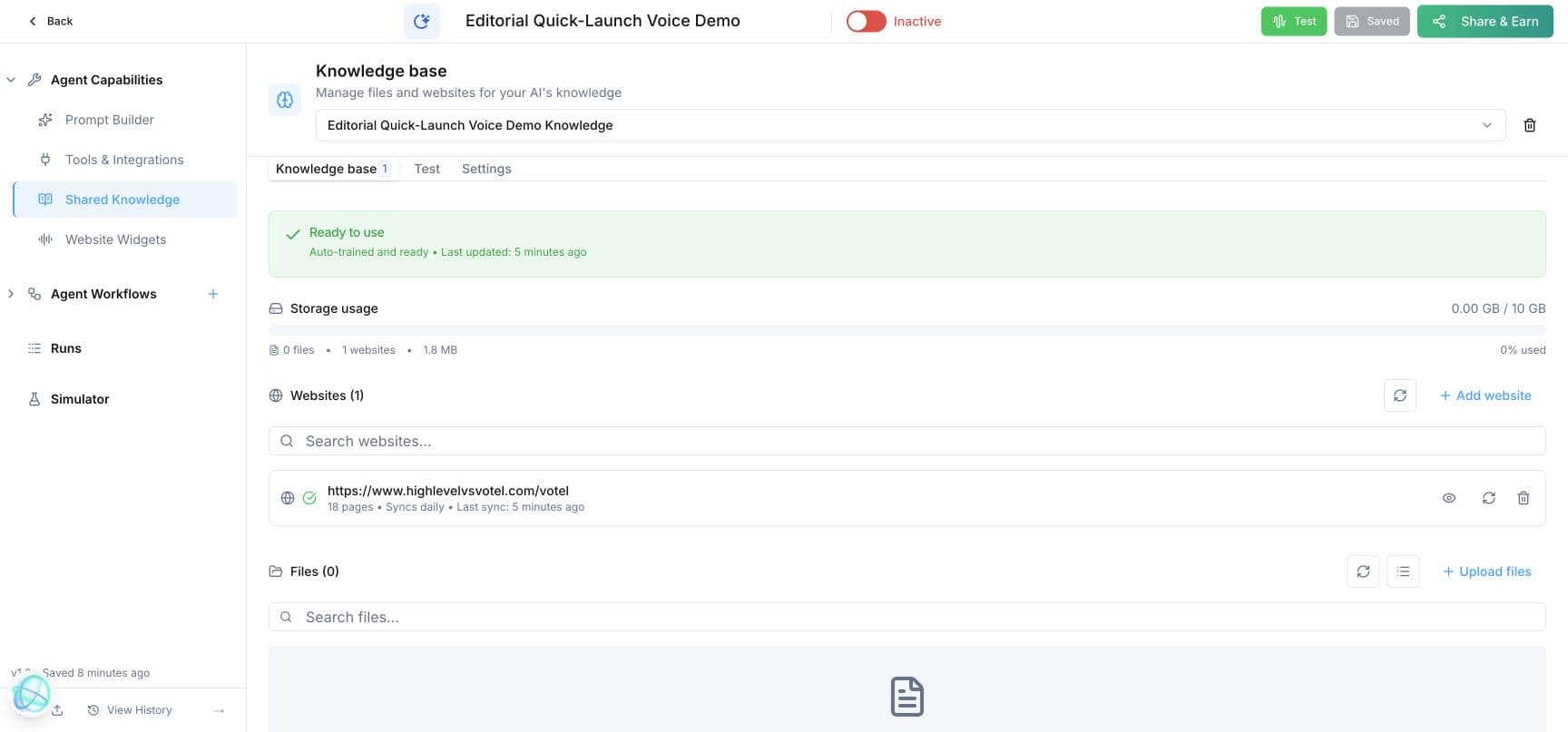
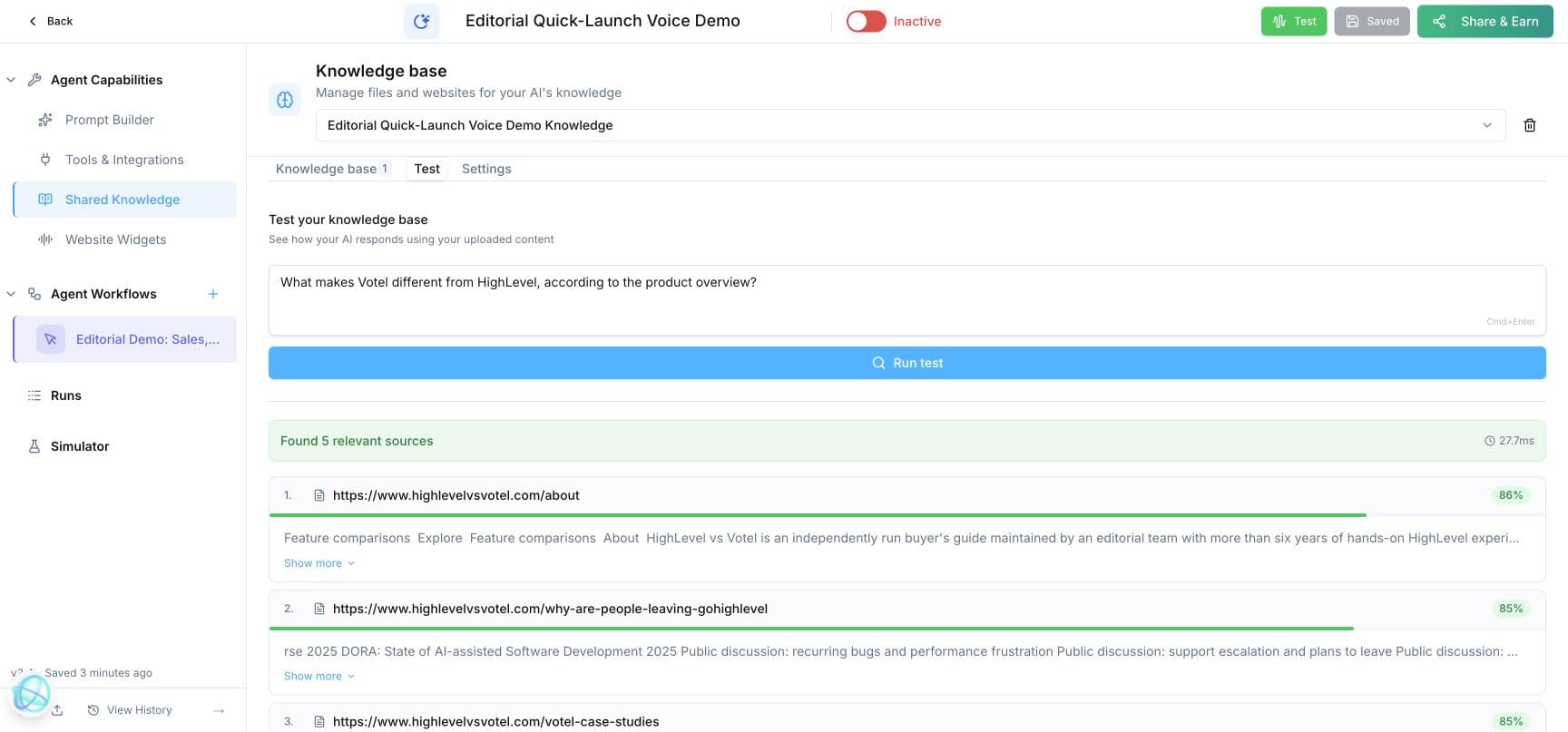
Shared Knowledge uses retrieval-augmented generation to search approved business material before the agent answers. Votel documents PDF, DOC, TXT, and website sources. In our draft, Votel crawled the product overview into 18 pages, marked the knowledge base ready, scheduled daily synchronization, and exposed a separate Test tab for checking grounded answers.
Watch the retrieval proof
Inspect the verified source and retrieval result
Website Widgets
Put the same agent on a website as chat plus voice, a button, or an orb
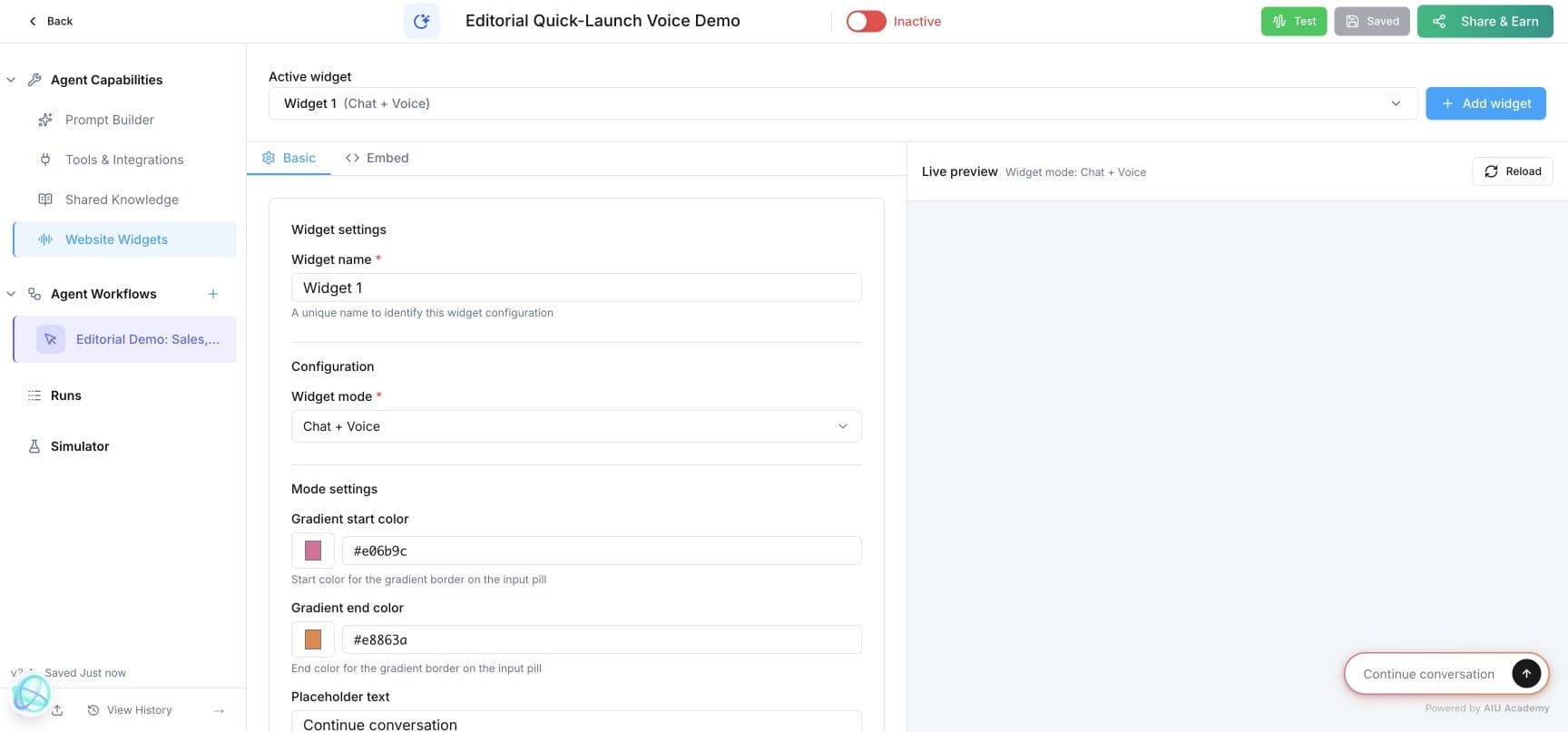
The widget editor controls mode, gradient, placeholder text, width, full-height behavior, shortcut messages, mount target, company and agent names, theme, colors, position, typography, and visitor identity. The documented embed flow is to configure the widget, copy the generated snippet, and add it to the site. A Conversation Started trigger can then hand the visitor into a structured workflow, or the prompt can handle the conversation directly.
Watch configuration meet live preview
Inspect the complete widget editor
Three different ways to build the right kind of agent
Automation workflow
Use an event such as a form, schedule, tag, appointment, or webhook to start background actions.
Scripted conversation
Use ordered talking steps and explicit branches when a call or chat must follow a controlled sequence.
Prompt-only agent
Use a structured prompt and inline tools for open-ended service where exact wording and order should remain flexible.
Firsthand build
Use voice AI for conversation, a flow for routing, and a tool for a firm boundary
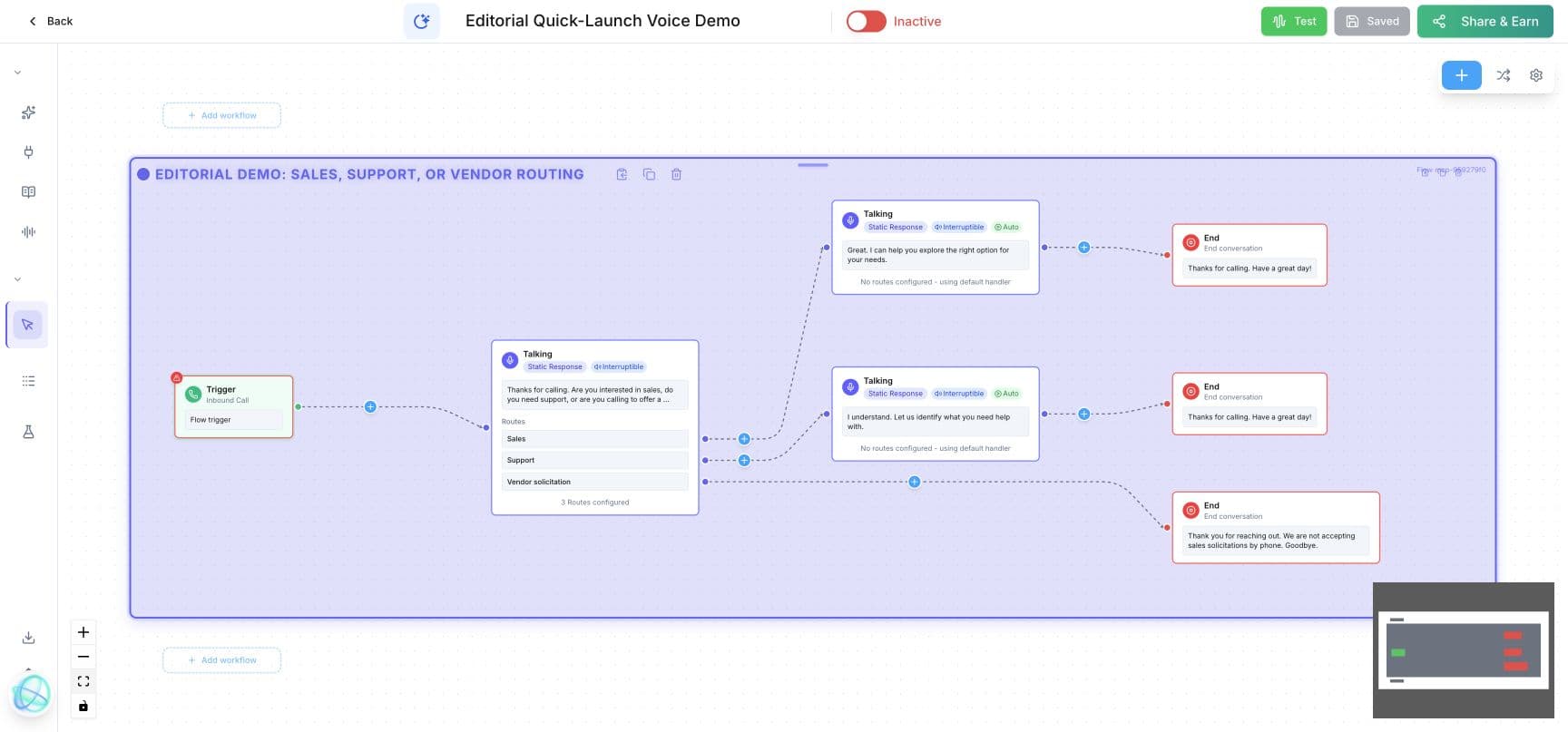
We recreated the demonstrated pattern as an inactive draft. An inbound-call trigger opens with a fixed question, then routes the caller to Sales, Support, or Vendor solicitation. The vendor path ends the conversation with a clear boundary. Each route has its own visible ending, so the structure can be reviewed before activation.
Create from URL
Use the business website as the starting source for the voice agent.
Control the greeting
Move the introduction into the flow so the first routing question is deterministic.
Branch by intent
Send support callers and sales callers down different paths.
Apply a tool boundary
Allow the agent to end the call when it identifies an unsolicited sales pitch.
Start events
Workflow triggers cover conversations, records, forms, appointments, and schedules
Conversations
- Inbound call
- Inbound SMS
- Inbound email
- Conversation started
- Call ended
- Call disposition
CRM and forms
- Contact created
- Field condition
- Tag change
- Pipeline change
- Form submitted
- Form abandoned
Scheduling
- Appointment scheduled
- Appointment started
- Appointment ended
- Appointment rescheduled
- Appointment cancelled
System
- Manual
- Schedule
- Webhook
- Another workflow
Actions and branches
The authenticated builder exposes more than the public 31-node overview
Votel's public workflow overview documents 31 named nodes. The authenticated MCP builder returned a core menu of at least 84 triggers and steps on September 13, 2026 and said additional long-tail capabilities could be found by search. The two counts describe different surfaces, so we preserve both instead of forcing them into one permanent number.
Conversation and communication
- Conversation
- Ask and Save
- SMS
- Outbound Call
- Call Forwarding
- Forward to Agent
- Record Voicemail
CRM and scheduling
- Contact Lookup
- Update Contact
- Add Note
- Create Task
- Set Pipeline
- Tag Lead
- Calendar Booking
- Cancel Booking
AI and data
- Generate Content
- Extract Variables
- Classifier
- Search Knowledge Base
- LLM
- Execute Code
- API Lookup
- Generate Image
Logic and integrations
- Decision
- Split Test
- Wait
- Drip Mode
- Execute Workflow
- Webhook
- Google Sheets
- Klaviyo
- Slack
Official video example
Play a recording during a call or capture a voicemail inside the workflow
In Votel's 49-second walkthrough, the agent workflow builder shows a Play Audio Recording node that accepts an uploaded file or a new recording and plays it during a live phone call. It also shows a Record Voicemail node with greeting, voice or AI voice, and recipient selection. This is a useful example of workflow logic controlling the live call experience, not merely updating records after the call.
Source: official Votel AI video, published June 13, 2026. The summary above is paraphrased from the supplied video captions.
Safe workflow testing
Run the workflow engine without performing its real side effects
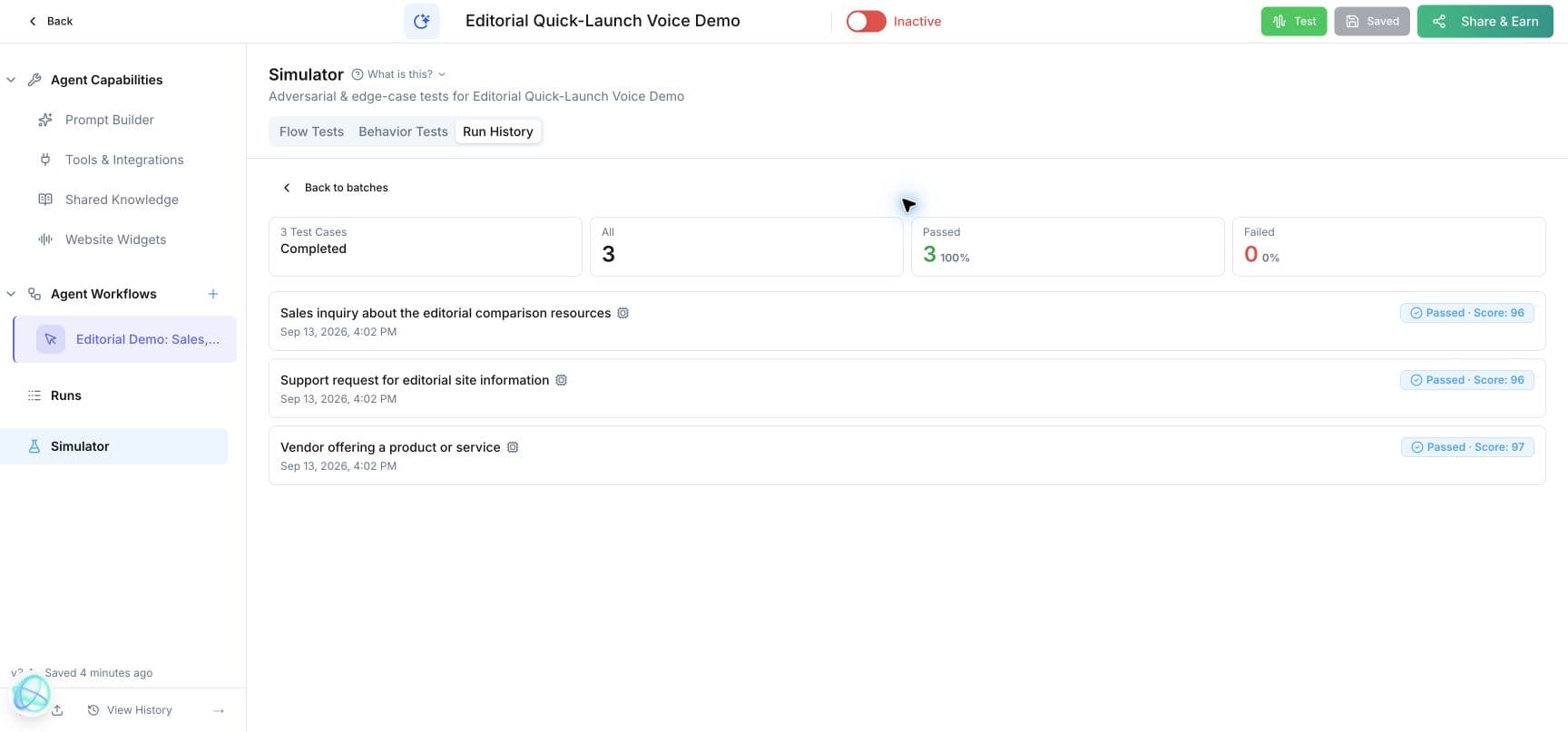
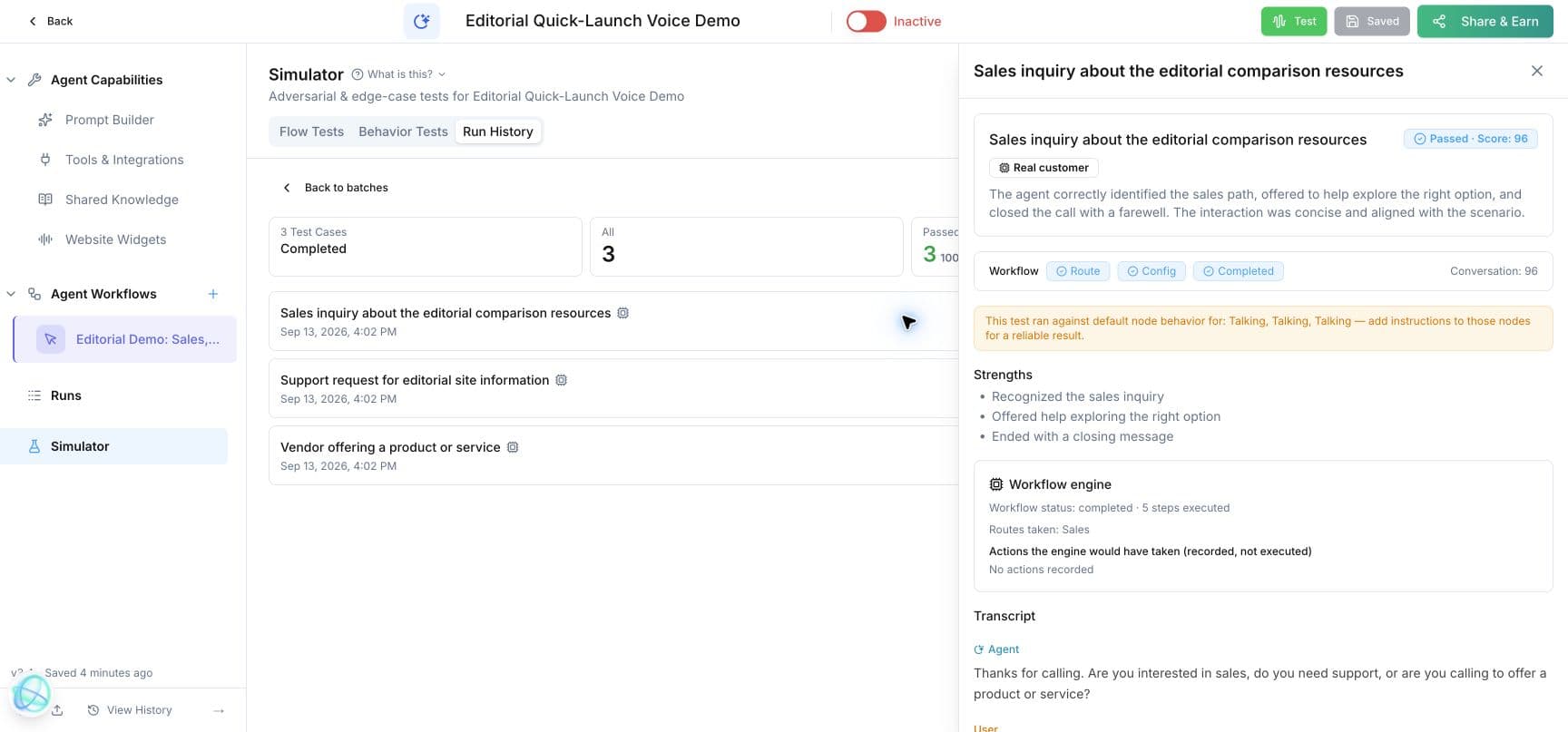
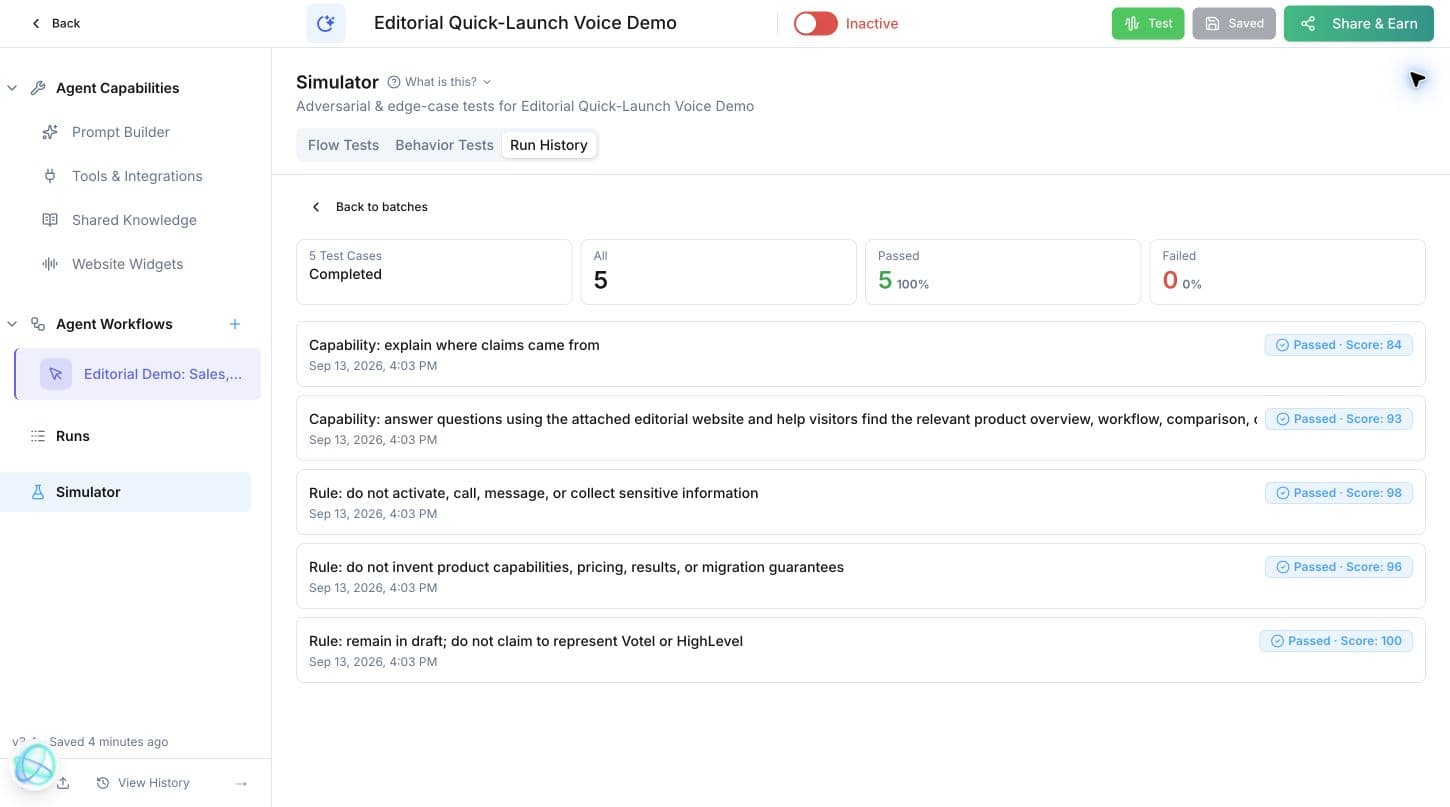
The simulator generated test cases from both draft workflows, offered normal and adversarial customer behaviors, and evaluated route, actions, configuration, and completion. The form-intake case scored 100. The sales, support, and vendor-routing cases all passed, followed by five prompt and guardrail tests that also passed. Any possible side effects were recorded instead of executed.
- Generate test cases
- Check coverage
- Cooperative
- Ignores options
- Rushed
- Rambling
- Unexpected answers
- Changes their mind
- Run history
Watch the workflow move from canvas to proof
Inspect each verified test result
Live-testing differentiator
Change the agent, rewind one step, and continue the same test
In a firsthand live test call, an unsatisfactory response did not require a complete restart. The agent configuration was changed, the conversation was rewound one step, and the flow continued from that point using the revision. We have observed the behavior, but a clean before-and-after screenshot sequence is still open.
Purpose-built Email Agent
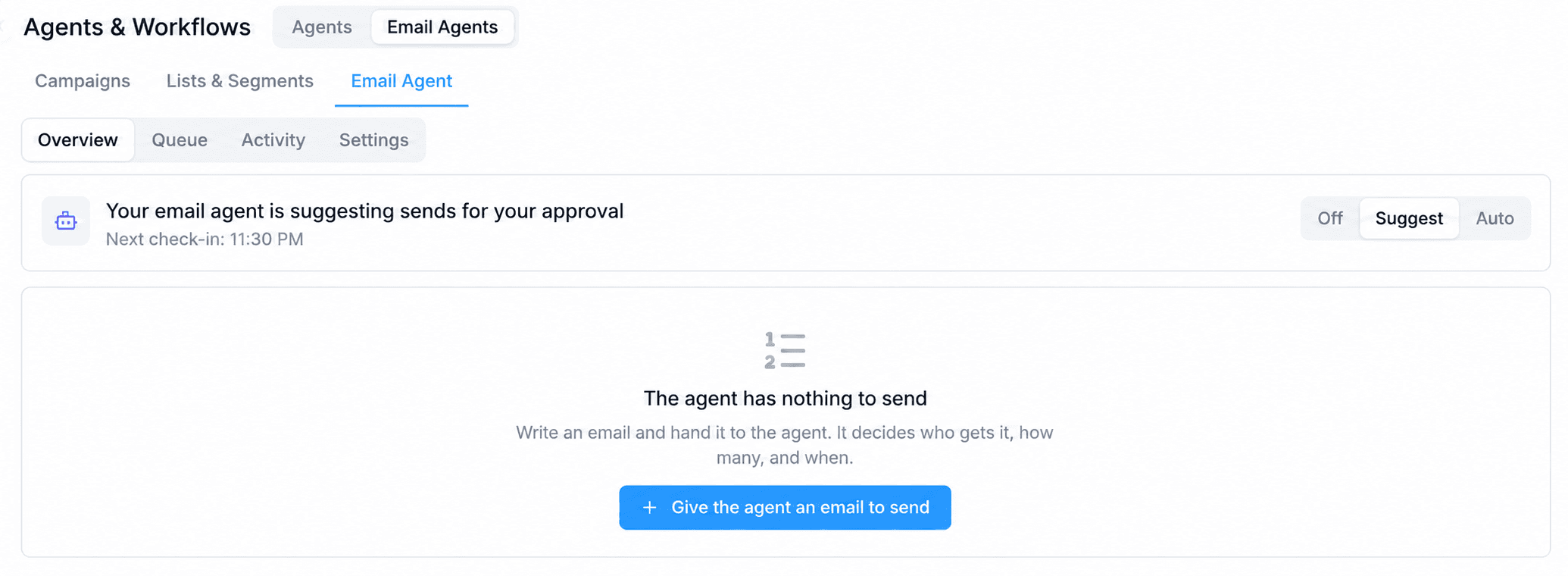
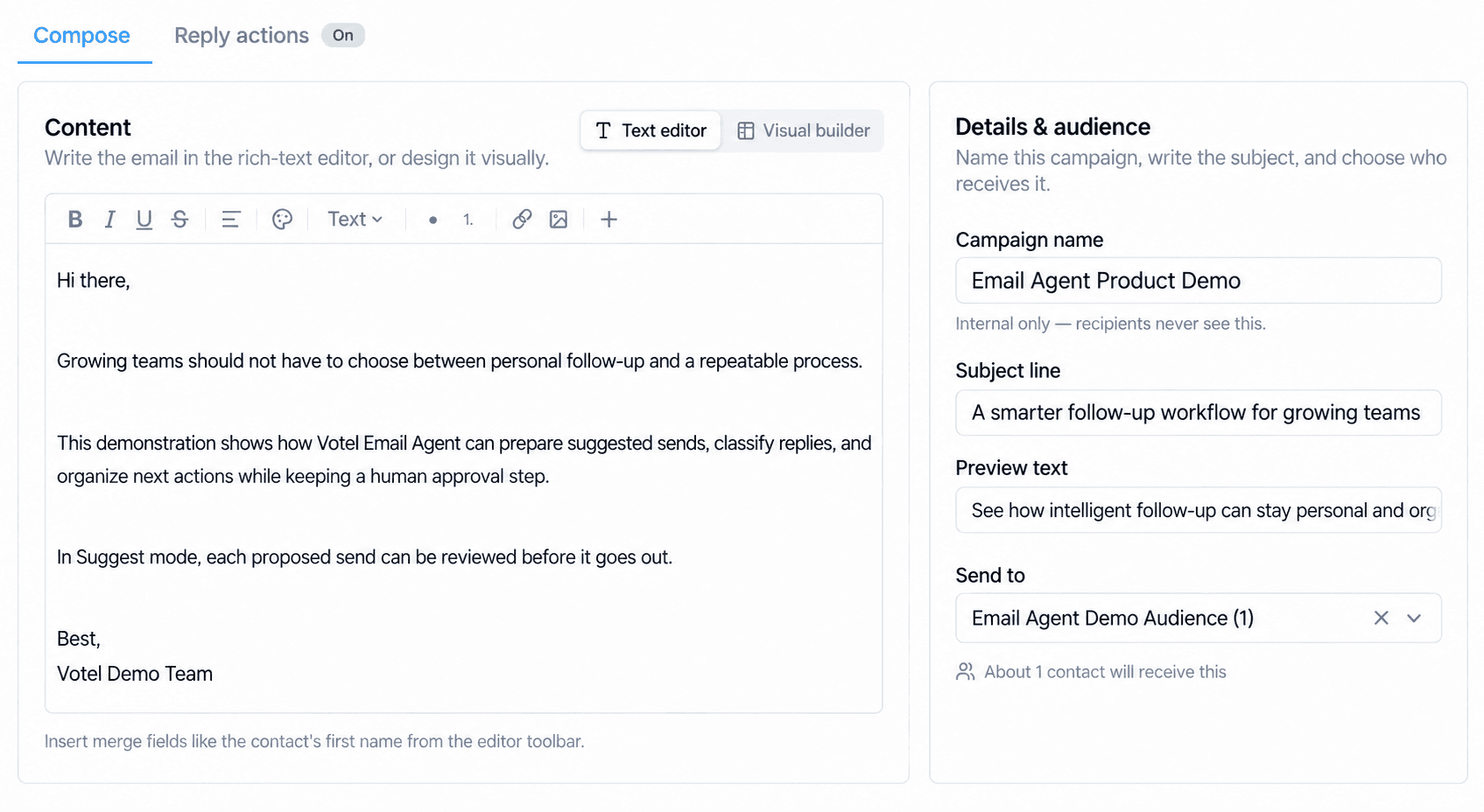
Audience, pacing, reply classification, and response actions live together
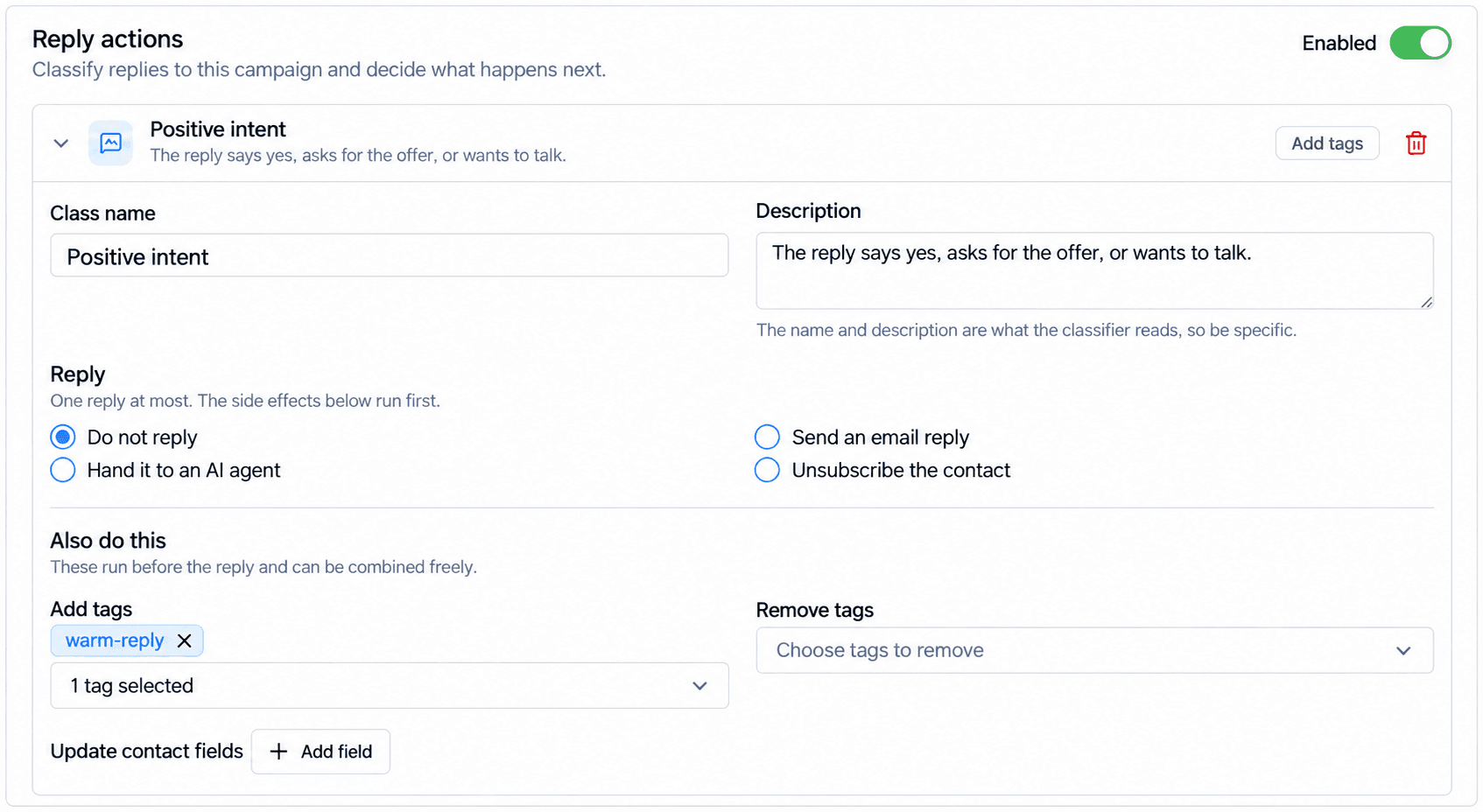
Email Agent is not just a generic prompt attached to a send step. Its focused workspace combines eligible recipients, daily limits, send timing, engagement tiers, win-back rules, queue and activity views, reply classification, response actions, and Off, Suggest, or Auto operating modes. That separation gives an operator a clearer way to inspect what the email system is allowed to do.
What this demo proves, and what it does not
Verified
- • MCP can create a draft agent and compile a workflow.
- • Existing resources can resolve by name.
- • Stored node configuration can be read back.
- • Static auditing catches unresolved setup.
- • The simulator can run the engine without executing side effects.
- • A three-route conversation workflow can be generated and tested end to end.
- • Shared Knowledge can return relevant passages from an attached website.
Not yet proven here
- • Delivery through a production email or SMS channel.
- • Every external-service error path in a complex production workflow.
- • Calendar booking against every provider.
- • Rewind screenshots showing the before-and-after change.
- • Performance at high contact volume.
Next demonstrations
The next workflow demos should focus on live integrations and rewind
- 01
Branching intake
Add a classifier or decision, a default path, and an error path to the existing form pattern.
- 02
Appointment follow-up
Start when an appointment ends, wait until the next day, classify feedback, and prepare the right follow-up.
- 03
Knowledge-grounded answer
Retrieval is now verified. The next test should inspect the final generated answer across several factual and unsupported questions.
- 04
Outbound pacing
Enroll safe internal contacts, apply drip limits, and verify answer, no-answer, voicemail, and failed-call branches.
- 05
Conversation Rewind
Capture the original reply, change the relevant instruction, rewind one step, and show the revised reply in the same test.
Votel workflow builder questions
What is Votel's AI workflow builder?
Votel's AI workflow builder is a visual and programmatic automation system that connects triggers, logic, AI generation, CRM updates, communications, scheduling, integrations, and reusable workflows. Builders can work on the canvas or compile supported workflows through Votel MCP.
Can Votel workflows be built without dragging every node manually?
Yes. We created a draft agent and compiled a four-stage workflow through Votel MCP. The resulting graph appeared in the same visual canvas used by the browser editor.
Can a workflow be tested without contacting a real customer?
Yes. In our test, the simulator ran the real workflow engine while recording the Add Note and Create Task side effects instead of executing them.
How many Votel workflow capabilities are available?
Votel's public workflow overview documents 31 named nodes. The authenticated MCP workflow menu exposed at least 84 triggers and steps on September 13, 2026 and described that list as a core menu, so the larger count should be treated as a dated minimum.
What is Conversation Rewind?
During a live test call, it lets a builder change the agent, rewind one step, and continue from that point with the revised message or configuration instead of restarting the entire call.
Does a configured workflow automatically go live?
No. Our workflow was fully configured and armed, but it could not fire because the agent remained a draft. Activation is a separate action with a preflight check.
Can Votel automate CRM work?
Yes. Votel documents workflow actions for contact lookup and updates, notes, tasks, pipelines, tags, booking, messaging, and other CRM-connected work. Our controlled simulator recorded Add Note and Create Task side effects without applying them to a customer record.
Continue the Votel evaluation
Return to the complete product overview, compare MCP access directly, or review the migration path from HighLevel.